25 September 2026 · 6 min read
Learning ML with Python: the libraries you need (NumPy, pandas, scikit-learn, PyTorch) and what each is for
Four Python libraries come up when you start machine learning. This post explains what NumPy, pandas, scikit-learn and PyTorch each do, which one to learn first, and when you need the other three.
Four Python libraries show up in most "learn machine learning" lists: NumPy for arrays of numbers, pandas for tables, scikit-learn for classical models, and PyTorch for building and training neural networks. They get listed side by side, which makes it look like you need all four before you can start. For modern machine learning (vision, language, RL, and large language models), most of the work happens in PyTorch, and the other three come in when a specific task calls for them.
Which library to start with
It depends on the work you want to do. If you are heading into modern ML, such as ML engineering or research on language, vision, or reinforcement learning, PyTorch is the library you will use most, and it is the one to spend your time on. If you are heading into data science, where the data is usually a table and the models are usually classical ones like random forests, pandas and scikit-learn do most of the work.
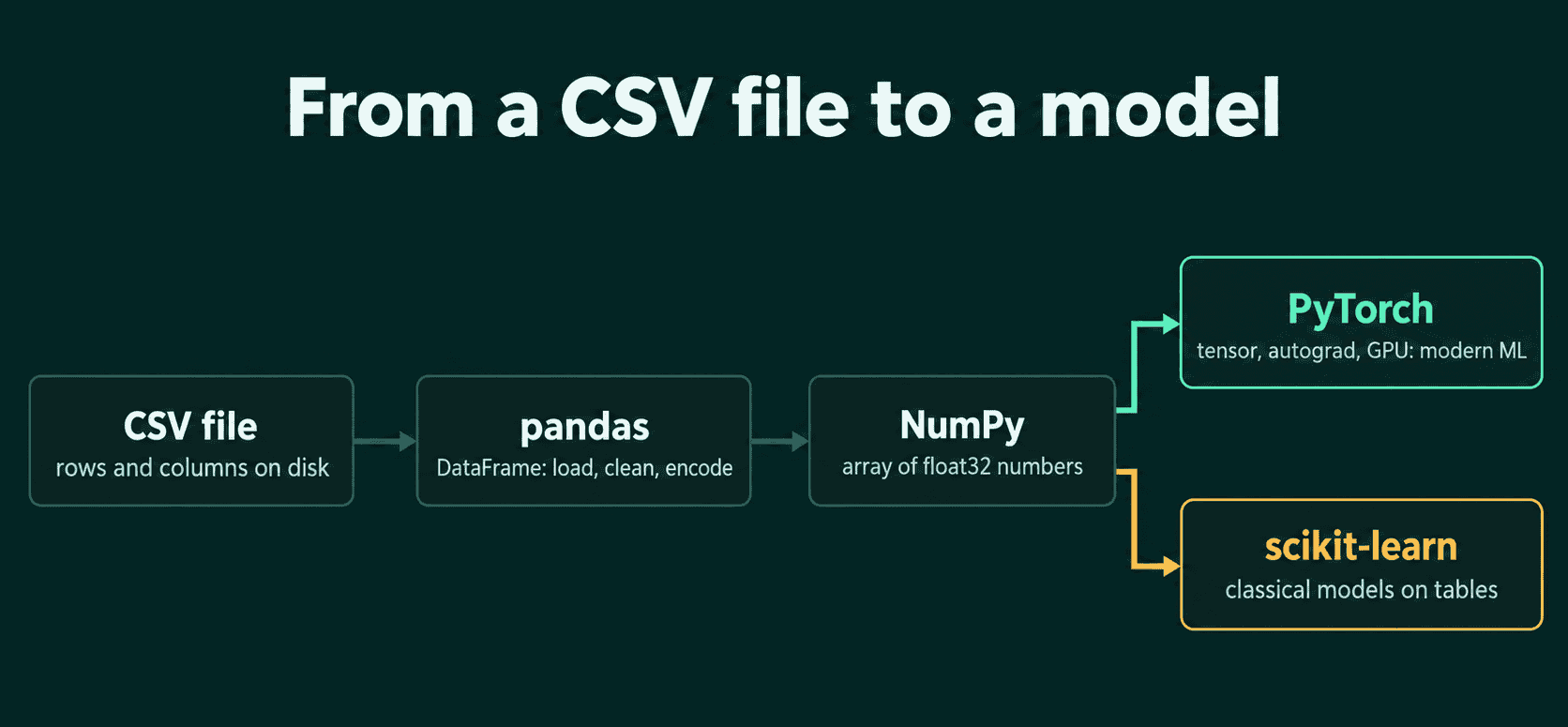
The other libraries still have their place in both paths. NumPy is how PyTorch trades arrays with the rest of Python, pandas is how you load and clean a table before it becomes a tensor, and scikit-learn is a quick way to get a classical baseline on tabular data.
PyTorch: modern machine learning
PyTorch is the library most ML research code is written in. In production it is common alongside JAX, and trained models are often exported to faster runtimes, such as ONNX Runtime, TensorRT, or C++ engines like llama.cpp, to serve them. Three things make it the center of the work.
A tensor is PyTorch's array: a grid of numbers with a shape, like a vector of shape (3,) or a batch of images of shape (32, 3, 224, 224). Everything you feed a model and everything it produces is a tensor.
Autograd records the math you run on tensors and computes the gradient of the loss with respect to every weight when you call loss.backward(). The gradient says which direction to move each weight to make the loss smaller, and computing it by hand for a network with millions of weights is not practical.
GPU support comes from moving tensors and models to a device with .to("cuda"). The same code runs on a CPU for small experiments and on a GPU when the model gets large.
Here is a full training loop that fits a straight line, $y = 3x + 0.5$, from 100 points:
1import torch
2
3x = torch.linspace(0, 1, 100).unsqueeze(1)    # 100 inputs, shape (100, 1)
4y = 3 * x + 0.5                                # targets from a known line
5
6model = torch.nn.Linear(1, 1)                  # one weight, one bias
7optimizer = torch.optim.SGD(model.parameters(), lr=0.1)
8loss_fn = torch.nn.MSELoss()
9
10for step in range(500):
11    loss = loss_fn(model(x), y)
12    optimizer.zero_grad()
13    loss.backward()
14    optimizer.step()
15
16print(model.weight.item(), model.bias.item())  # about 3.0 and 0.5
The five steps inside the loop (predict, compute the loss, clear old gradients, backpropagate, update) are the same ones that train a transformer, with a different model, data, and loss.
NumPy: the array format the rest of Python uses
NumPy is Python's standard array library, and it is about ten years older than PyTorch. SciPy, pandas, scikit-learn, OpenCV, and matplotlib all take and return NumPy arrays, so you meet NumPy whenever your data comes from one of them or goes to one of them. That includes plotting a loss curve, reading an image with OpenCV, or loading a .npy file someone saved.
It is also common in data loading code. The part of a PyTorch Dataset that reads and transforms one example often works on NumPy arrays on the CPU, then hands a tensor to the model.
Learning ML from scratch is sometimes given as a reason to learn NumPy first. Writing linear regression or backpropagation by hand works just as well with PyTorch tensors, as long as you compute the gradients yourself instead of calling loss.backward().
Moving between the two is one call each way:
1import numpy as np
2import torch
3
4arr = np.array([1.5, 2.5, 3.5])      # NumPy defaults to float64
5t = torch.from_numpy(arr)             # shares memory with arr, stays float64
6arr[0] = 10.0
7print(t)                              # tensor([10.0000,  2.5000,  3.5000], dtype=torch.float64)
8
9t32 = t.float()                       # float32 copy, the dtype most models expect
10back = t32.detach().cpu().numpy()     # the safe way back to NumPy
torch.from_numpy does not copy the data, so changing arr also changes t. Going back, .detach() is needed when the tensor is tracked by autograd, and .cpu() when it lives on a GPU, because NumPy arrays only live in CPU memory.
pandas: tables
pandas stores a table as a DataFrame: named columns, each with its own type, like a spreadsheet you control from code. It is the usual tool for loading a CSV file with pd.read_csv, filling in missing values, turning text categories into numbers, joining two tables on a shared column, and computing summaries per group.
Many ML projects never touch pandas, because images, text, and audio usually load straight into tensors. When the data does start as a table, pandas is a common way to load it, inspect it, and prepare it before it becomes a tensor. It also shows up at the end of some projects, as a way to collect the results of many training runs into one table and sort them.
1import pandas as pd
2import torch
3
4df = pd.DataFrame({
5    "size_m2": [50, 80, None, 120],
6    "rooms": [2, 3, 3, 4],
7    "city": ["Berlin", "Munich", "Berlin", "Hamburg"],
8    "price": [300_000, 520_000, 410_000, 690_000],
9})                                                  # pd.read_csv("houses.csv") in real code
10
11df["size_m2"] = df["size_m2"].fillna(df["size_m2"].median())
12df = pd.get_dummies(df, columns=["city"], dtype=float)  # one 0/1 column per city
13
14X = torch.from_numpy(df.drop(columns="price").to_numpy(dtype="float32"))
15y = torch.tensor(df["price"].to_numpy(), dtype=torch.float32)
16print(X.shape)                                      # torch.Size([4, 5])
The house table becomes five numeric feature columns (size, rooms, and one column per city) and a price target, ready for a model.
scikit-learn: classical machine learning
scikit-learn is a library of classical ML models: linear and logistic regression, decision trees, random forests, gradient-boosted trees, support vector machines, k-means clustering, and principal component analysis (PCA). Most models share the same two methods, fit to train the model and predict to use it, so trying five models on one dataset takes a few lines.
It works on any table of numeric features, and in practice most of its use is on tabular data in data-science work: predicting churn from customer records, prices from listings, or fraud from transactions. On that kind of data, a random forest or gradient-boosted trees are a strong baseline and often beat a neural network. Libraries built only for boosted trees, such as XGBoost and LightGBM, are common there too.
Modern ML on images, text, audio, and large language models rarely uses scikit-learn for the models themselves. Some projects still borrow its ready-made metrics or its PCA, although both are short to write in PyTorch.
Which libraries you need, by goal
| Goal | Learn first | Add when needed |
|---|---|---|
| Modern ML engineer or researcher | PyTorch | NumPy basics, pandas for tables |
| Data scientist on tabular data | pandas, scikit-learn | PyTorch for neural networks |
| Learning ML from scratch | PyTorch | NumPy and pandas as you meet them |
A common mistake is spending weeks on NumPy and pandas tutorials before training a single model. The parts of both that ML code uses are small, and they are easier to learn at the moment a task needs them. A second mistake shows up at the handoff between libraries: NumPy defaults to 64-bit floats, most PyTorch models use 32-bit floats, and passing a float64 tensor into a float32 model raises a dtype error. Calling .float() on the tensor, or to_numpy(dtype="float32") in pandas, fixes it.
QuiddityML's PyTorch track starts with what a tensor is and gives the NumPy handoff its own concept, where the exercises include predicting what a tensor holds after the NumPy array it was built from changes, and writing a function that safely turns a GPU tensor back into a NumPy array (quiddityml.com).