By Sagi Shaier · 23 October 2026 · 6 min read
Unicode and UTF-8 explained: how computers store text
How a character becomes a code point and then bytes, why the same word can take a different number of bytes in different scripts, and how to fix text that compares wrong or shows up garbled.
Unicode is the standard that gives each character a number, and UTF-8 is the most common way of writing those numbers down as bytes. Most text on the web is stored this way. It decides how long a piece of text really is in memory, whether two strings that look the same actually match, and whether text scraped from the web comes out readable.
Two steps to store a character
The smallest units a language model could read are single characters, and a computer already stores each character as a number. Storing one takes two steps.
- Give the character a number. A standard called Unicode assigns one to every character, including Latin and Arabic letters, Chinese characters and emoji. That number is the character's code point, written like U+0041 for capital A. The digits after "U+" are in hexadecimal (base 16), so 41 in hex is 65 in ordinary counting.
- Write the number down as bytes. A byte is the basic unit of computer storage, and it holds a value from 0 to 255. The rule for turning a code point into bytes is an encoding, and the common one is UTF-8.
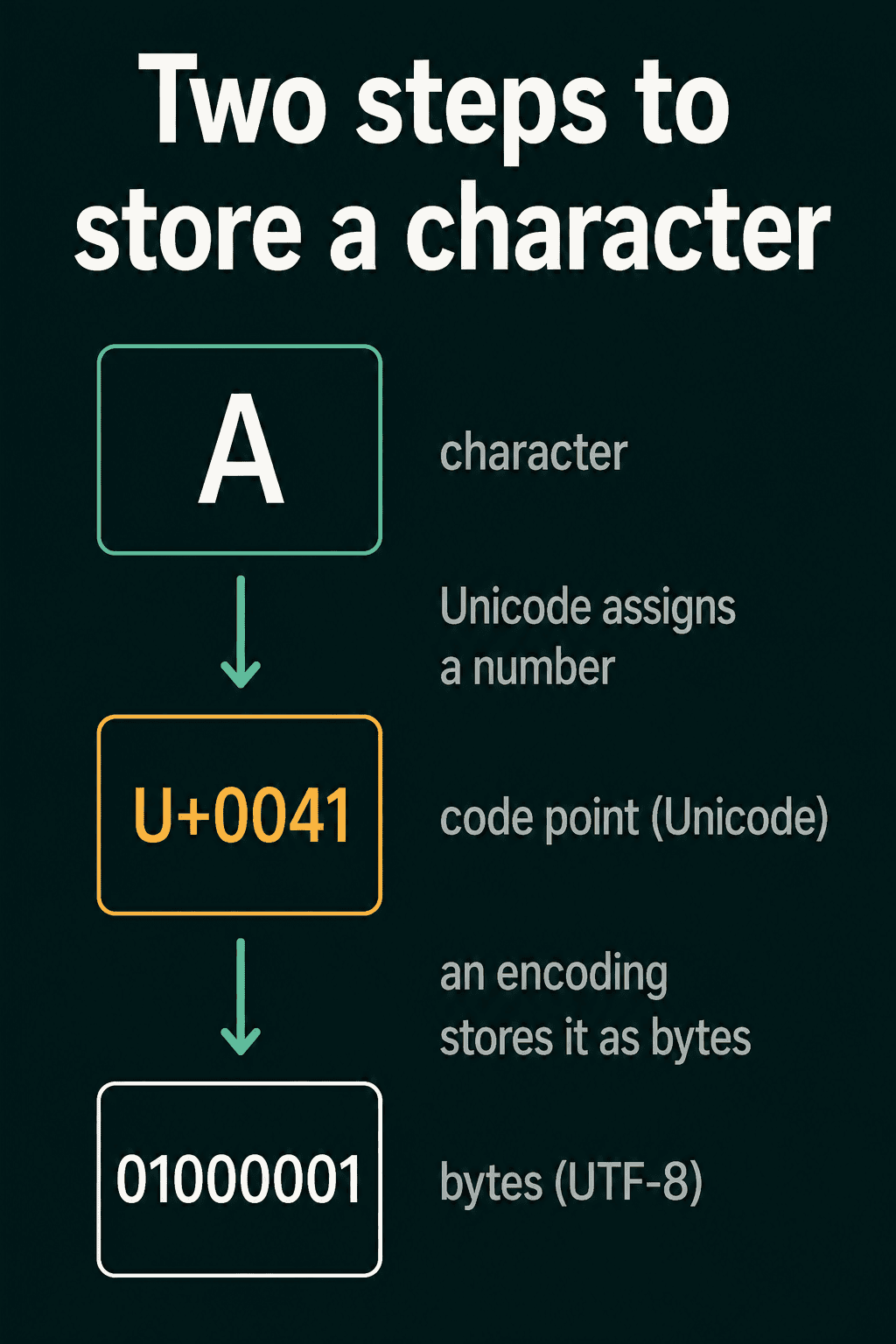
For capital A, UTF-8 writes a single byte with the value 65, shown in the picture in binary as 01000001.
Before Unicode, a scheme called ASCII covered 128 English symbols, and other scripts used their own schemes that did not agree with each other. Unicode replaced them with one shared map.
In Python, ord gives a character's code point and .encode("utf-8") gives its bytes:
1for ch in ["A", "é", "中", "😀"]:
2    code_point = ord(ch)              # the Unicode number
3    data = ch.encode("utf-8")         # the bytes UTF-8 writes
4 print(ch, f"U+{code_point:04X}", data.hex(" ").upper(), f"({len(data)})")1A U+0041 41 (1)
2é U+00E9 C3 A9 (2)
3中 U+4E2D E4 B8 AD (3)
4😀 U+1F600 F0 9F 98 80 (4)Each line shows the character and its code point, then its bytes in hex and the byte count in brackets.
UTF-8 uses a different number of bytes per character
UTF-8 does not give every character the same number of bytes. English letters, digits and punctuation take one byte each. Accented letters take two. Most Chinese, Japanese and Hindi characters take three, and most emoji take four.
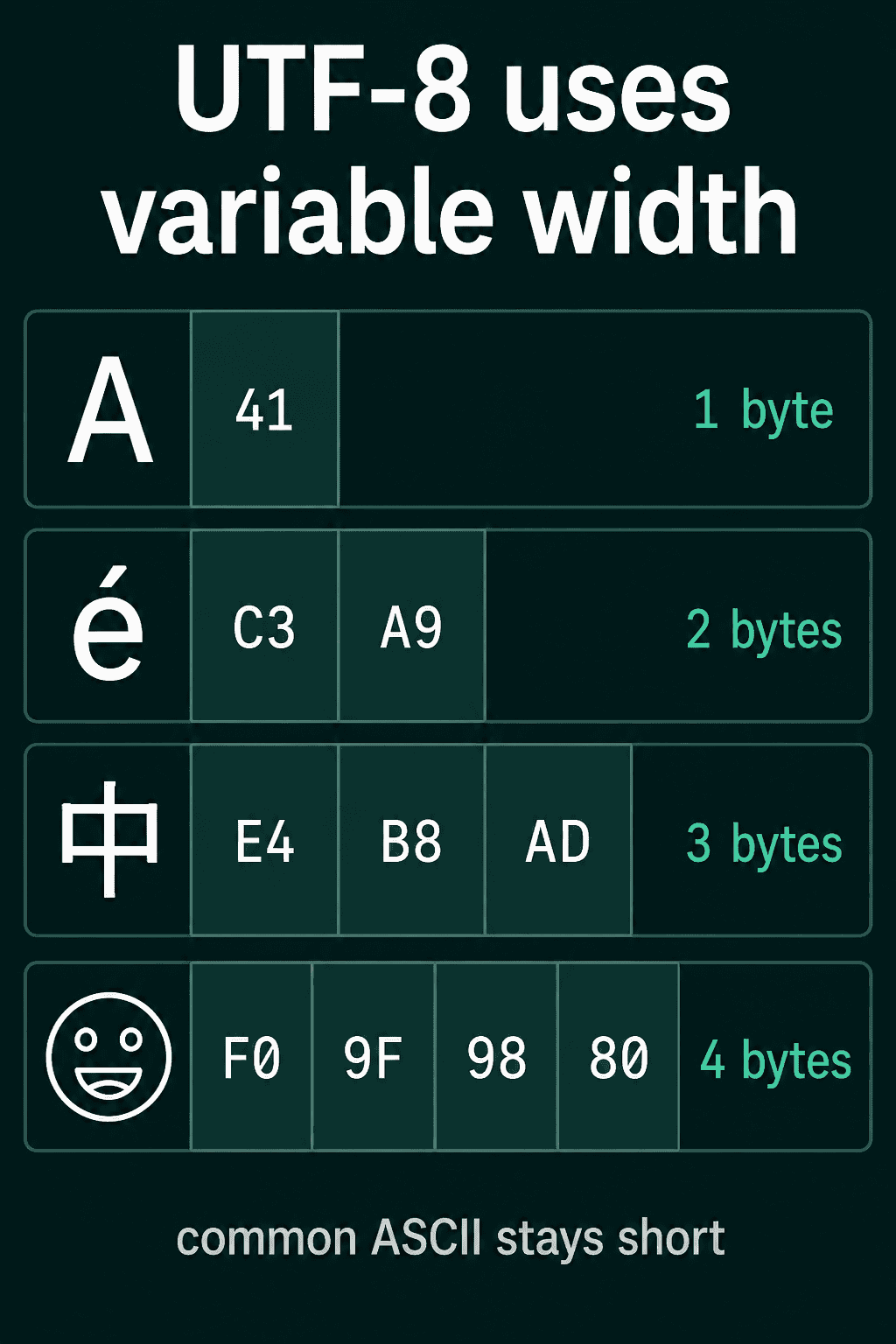
So the same message takes a different number of bytes depending on the script it is written in. For example, "café" is four characters and five bytes, because é takes two:
1text = "café"
2data = text.encode("utf-8")
3print(len(text), "characters")
4print(len(data), "bytes")
5print(list(data))
6
7# Cutting by bytes can split a character in half
8cut = data[:4]
9print(cut.decode("utf-8", errors="replace"))14 characters
25 bytes
3[99, 97, 102, 195, 169]
4caf�The last line shows what goes wrong when code cuts text by bytes. The first four bytes end halfway through é, so the leftover byte decodes to a replacement symbol. Code that cuts text to a length limit has to know whether it is counting characters or bytes.
Bytes as a model's units
Bytes give one answer to the question of what a model's units should be. Every file is already a sequence of bytes, and a byte holds one of 256 values. If a model takes bytes as its units, every text in every language becomes numbers from that same fixed set of 256. A new word, a rare name or an emoji never falls outside it.
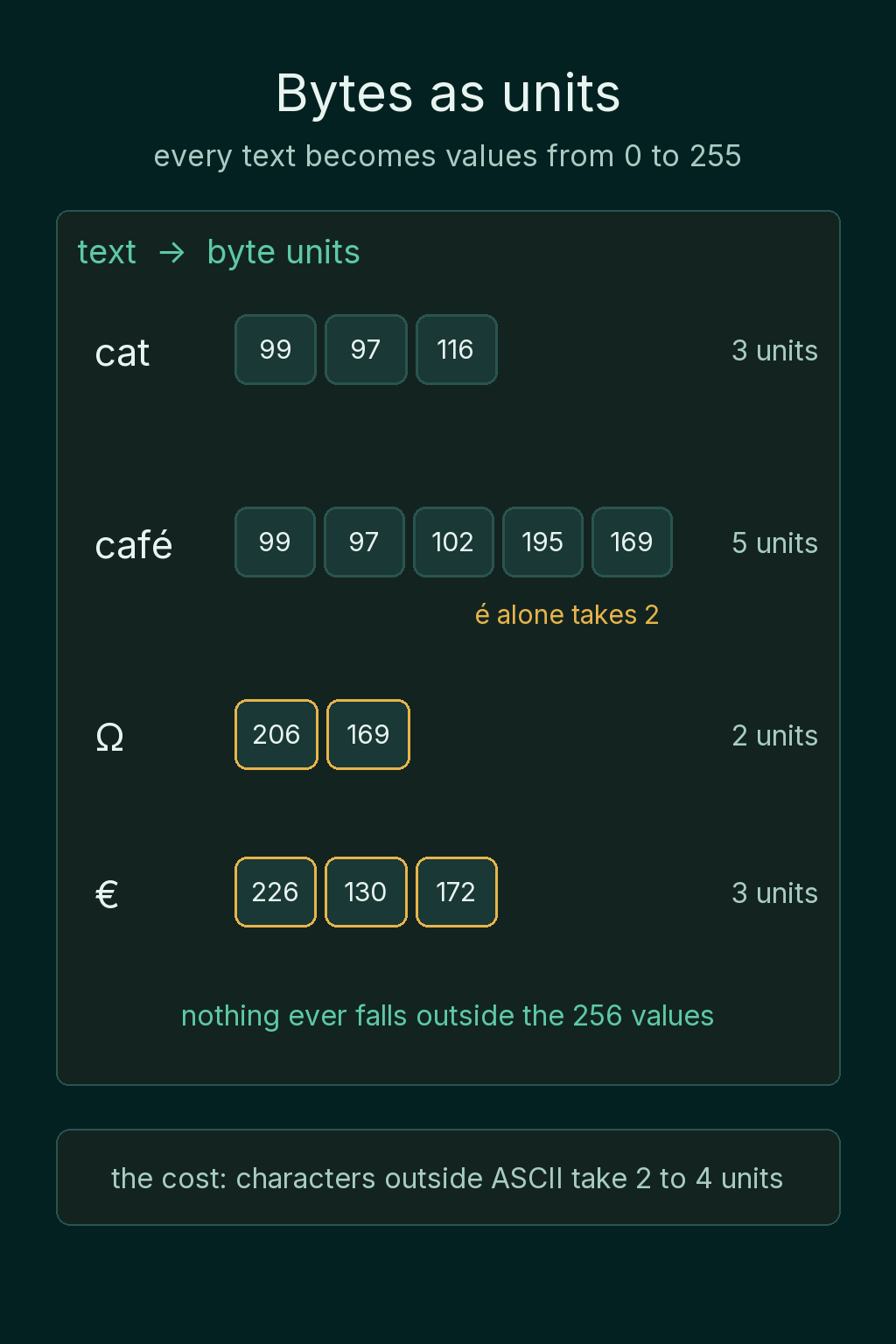
The cost is length. Each character outside ASCII becomes two to four byte units, so text in many scripts gives a much longer sequence than its character count suggests:
1for text in ["hello", "héllo", "你好世界", "👋🌍"]:
2 print(text, len(text), "characters,", len(text.encode("utf-8")), "bytes")1hello 5 characters, 5 bytes
2héllo 5 characters, 6 bytes
3你好世界 4 characters, 12 bytes
4👋🌍 2 characters, 8 bytesA longer sequence means more work for the model on every example.
When collected text breaks
Text collected from many sources hides two problems that only show up when you count or compare it.
Text that looks identical can differ
What a reader sees as one character is not always one code point. The letter é can be stored as U+00E9, a single code point. It can also be stored as U+0065 followed by U+0301, a plain e plus a combining accent that attaches to the letter before it. Both look identical on screen.
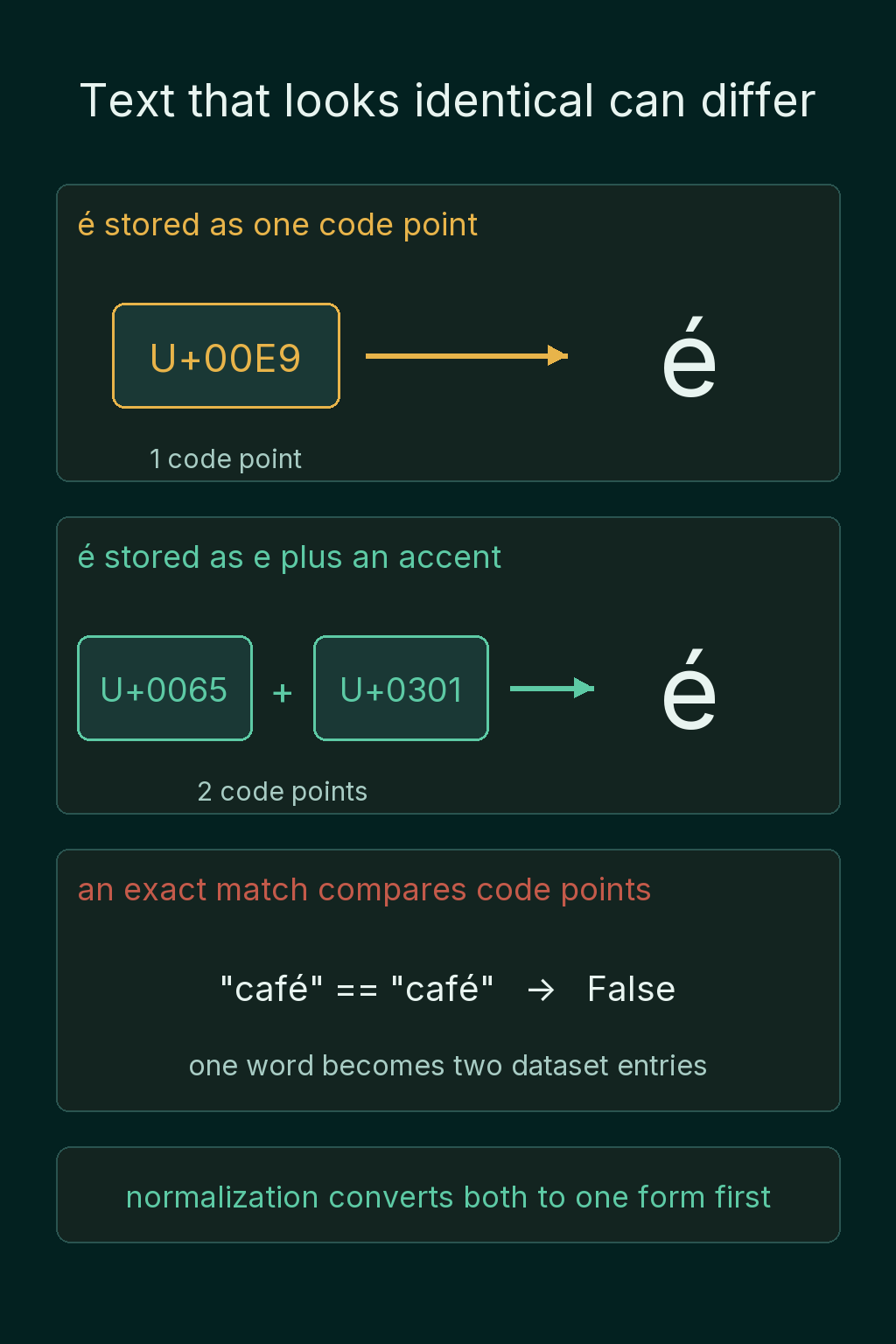
Exact comparison works on code points, not on what a reader sees. So one word can land in a dataset as two different entries. Unicode normalization converts text to one consistent form before comparing, which fixes the é case. In Python, unicodedata.normalize("NFC", text) does this, and NFC is the form that combines e plus the accent into the single code point U+00E9.
Some code points draw nothing at all. A zero-width space (U+200B) takes up no width on screen. A zero-width joiner (U+200D) glues several emoji into one, which is how a single family emoji is built out of several people. An invisible character inside a word makes a search miss that word. Normalization leaves it in place, so it has to be found and removed on purpose:
1import unicodedata
2
3one = "café" # é as a single code point
4two = "café" # e followed by a combining accent
5
6print(one, two)
7print(one == two)
8print(len(one), len(two))
9
10nfc_one = unicodedata.normalize("NFC", one)
11nfc_two = unicodedata.normalize("NFC", two)
12print(nfc_one == nfc_two)
13
14hidden = "dataset" # zero-width space inside the word
15print(hidden, hidden == "dataset", len(hidden))
16print(hidden.replace("", "") == "dataset")1café café
2False
34 5
4True
5dataset False 8
6TrueThe two cafés print the same and still compare as different strings with different lengths, until normalization makes them equal. The word with the hidden space prints as "dataset" and has 8 characters instead of 7.
Garbled text
Text scraped from the web or exported from old systems often shows up garbled, with symbols like é where é should be. The bytes on disk are usually fine. The problem is that they were read with the wrong encoding.
The same bytes decode to different characters under different encodings. A program reading a file has to know or guess which encoding wrote it, and a wrong guess turns each character outside ASCII into junk.
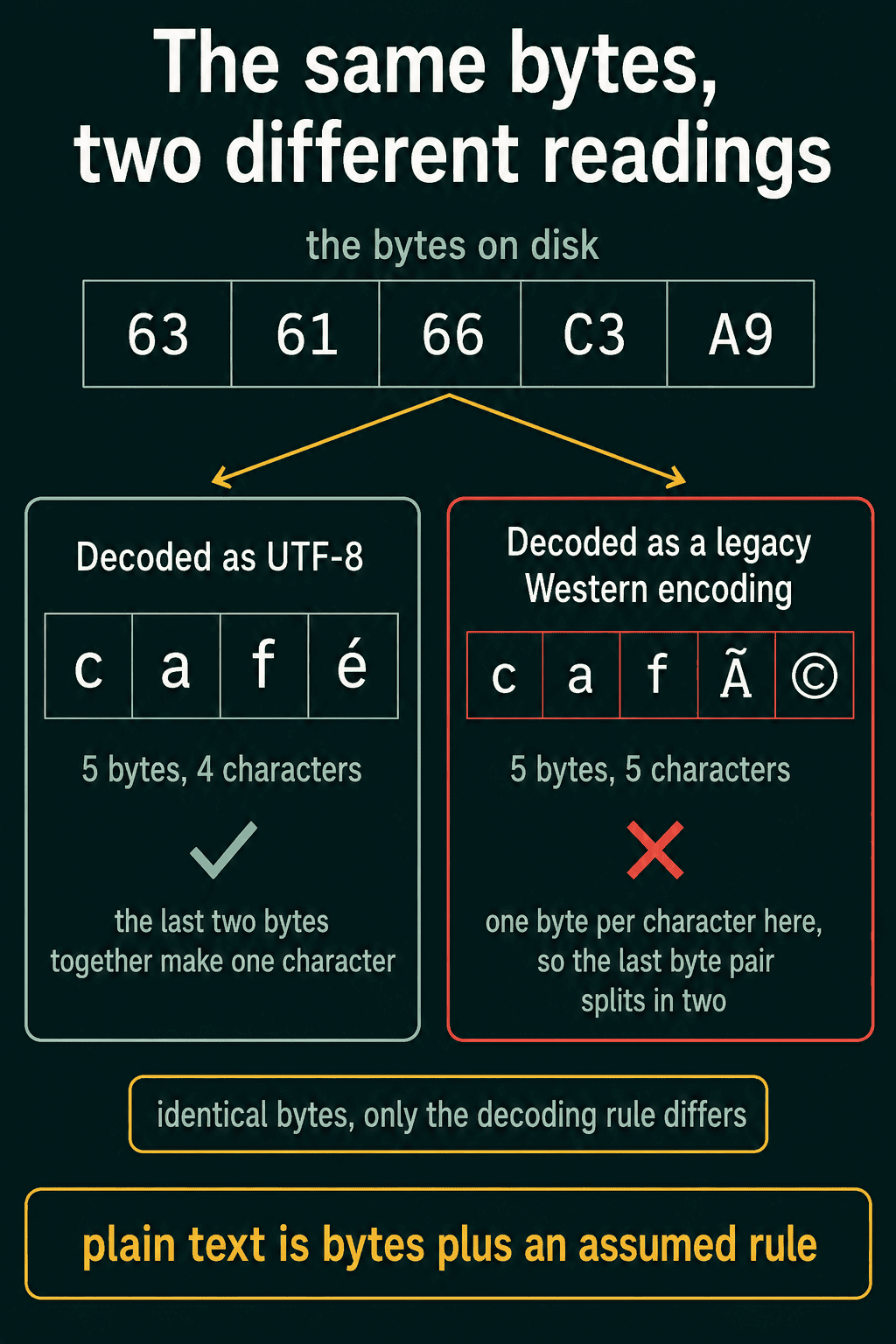
Latin-1 is one of those legacy Western encodings, and it reads every byte as its own character:
1data = "café".encode("utf-8")
2print(data.hex(" ").upper())
3print(data.decode("utf-8"))
4print(data.decode("latin-1"))163 61 66 C3 A9
2café
3caféA model trained on text like the last line learns the junk along with the words.
Common mistakes with Unicode and UTF-8
Mixing up characters and bytes. len(text) counts code points, while a storage limit or a file size counts bytes. Cutting the bytes at a fixed length can split a character in half, so decide which of the two a limit counts before cutting anything.
Comparing text without normalizing it. Text gathered from several sources can store the same word in two forms. Normalizing everything to NFC before deduplicating or searching keeps one word as one entry, and invisible characters such as U+200B need their own cleanup step.
Letting a program guess the encoding. When you open a text file in Python, pass the encoding yourself, as in open(path, encoding="utf-8"). If a file still shows é and similar symbols, it was most likely written in UTF-8 and read with a legacy encoding somewhere along the way.
Related concepts
Bytes are only one possible choice of unit for a language model. Why text is hard data for machine learning covers the other decisions raw text forces on an NLP system: what the units are, what numbers they get and how word order is handled. For the field as a whole, see What is NLP?.
QuiddityML teaches Unicode and UTF-8 in the text-as-data unit of its Intro to NLP track, and the exercises include ordering the path from a visible character to its stored bytes and working out why "café" takes five bytes.