By Sagi Shaier · 16 September 2026 · 7 min read
My loss is not decreasing: a checklist
A training loss that stays flat usually has one of a short list of causes. This checklist goes through them in a practical order: the data, the training loop, the learning rate, the loss function, initialization, and a one-batch test that separates a bug from a hard problem.
A loss that stays flat, or barely moves, is a common way for a training run to fail. Most of the usual causes are quick to check once you know what they are. This post goes through them in a practical order, cheapest checks first.
What "not decreasing" means
The loss is the number the training loop is trying to make smaller; it measures how far the model's outputs are from the targets on the current batch. Three shapes count as "not decreasing" and they point at different causes.
- Perfectly flat, to several decimal places. The parameters are not changing at all. This usually points at the training loop rather than the model.
- Noisy but with no downward trend. The parameters change but the changes do not help. The usual causes are the learning rate, the loss function, or the data.
- Decreasing, but far more slowly than expected. Often a learning rate that is too low or a loss that is scaled wrong.
Before anything else, note which of the three you have. Then work down the list.
1. Check the data
Print one batch and look at it. This step is easy to skip and often finds the problem.
- Do the inputs match the targets? Shuffling inputs and targets separately, or misaligning them by one row, gives a dataset that has nothing to learn. A quick test: train on a handful of examples and check that the model can at least memorize them.
- Are the inputs scaled? Pixel values of 0 to 255 or features in the thousands make the first layers' activations huge. Scale inputs to roughly zero mean and unit variance, or at least to 0 to 1.
- Are the targets the right type and shape? Cross-entropy in PyTorch takes class indices of shape
(N,)with dtypelong, not one-hot vectors and not floats. A regression loss such asMSELossneeds the prediction and target to have the same shape; a prediction of shape(N, 1)against a target of shape(N,)silently broadcasts into an(N, N)matrix and computes the wrong loss. - Are the labels all the same? A loader that returns a constant label, or a class-imbalance so extreme that one class is nearly all the data, gives a loss that flattens at the value of predicting the majority class.
2. Check the training loop
Every PyTorch loop needs three calls in this order on every step. A missing or reordered one produces a flat loss with no error message.
1for X, y in loader:
2    optimizer.zero_grad()        # clear the gradients from the previous step
3    loss = loss_fn(model(X), y)
4    loss.backward()              # compute new gradients
5 optimizer.step() # move the parameters- Missing
optimizer.step(). Gradients are computed and then discarded; the loss stays exactly constant. - Missing
optimizer.zero_grad(). Gradients accumulate across steps, so each update uses the sum of all past gradients. The loss usually rises or oscillates rather than staying flat, but it does not decrease. - The optimizer holds the wrong parameters.
torch.optim.SGD(model.parameters(), ...)created before the model was moved to the GPU or replaced with a new model object updates tensors the forward pass no longer uses. Confirm withnext(model.parameters()).gradafterbackward(); it should not beNone. - The loss is detached. Calling
.item(),.detach(), or wrapping the forward pass intorch.no_grad()cuts the computation graph;backward()then has nothing to propagate. Checkloss.requires_gradisTrue. - The model is in the wrong mode.
model.eval()left on during training disables dropout and freezes batch normalization statistics. Callmodel.train()at the start of each training epoch.
3. Check the learning rate
If the loop is correct and the loss is noisy with no trend, the learning rate is the next suspect.
- Too low. The loss drifts down so slowly it looks flat. Multiply the rate by 10 and look again.
- Too high. The loss jumps around or goes to
nan. Divide by 10. - Wrong for the optimizer. Plain SGD works at roughly 0.01 to 0.1; Adam works at roughly 1e-4 to 3e-3. A value copied from an SGD script into an Adam script is 100 times too large.
A learning rate range test, which multiplies the rate by a constant every step while logging the loss, finds a usable value in a hundred steps and is worth running once per new setup.
4. Check the loss function and the output layer
The loss function and the last layer of the model have to agree on what the model outputs. Several mismatches run without any error.
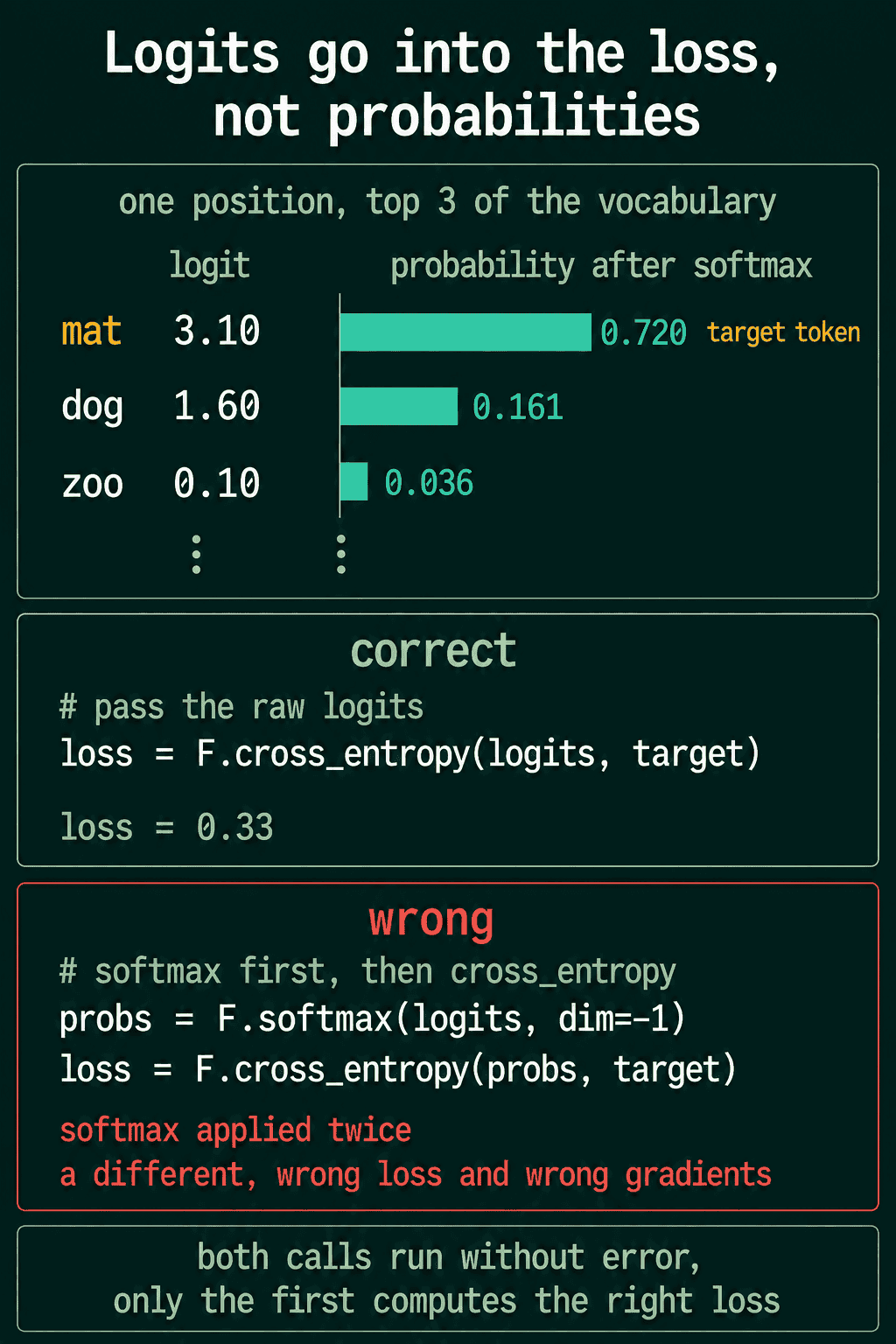
- Softmax before cross-entropy.
CrossEntropyLossapplies log-softmax internally and expects raw logits. Ann.SoftmaxorF.softmaxon the model's output feeds probabilities into a second softmax, which squashes them toward uniform and makes the gradients tiny. The loss decreases, but very slowly, and plateaus well above zero. Remove the softmax from the model. - Sigmoid before
BCEWithLogitsLoss. The same mistake for binary classification.BCEWithLogitsLosstakes logits;BCELosstakes probabilities. Use one or the other, not a sigmoid followed by the logits version. - Wrong reduction. A loss with
reduction="sum"is larger by the batch size than the same loss with the default"mean", which has the same effect as multiplying the learning rate by the batch size. - Wrong target shape. See the data section: a broadcast between
(N, 1)and(N,)computes a loss over every pair of examples. - Loss at the value of a constant prediction. For a classifier with $C$ balanced classes, a model that outputs the same thing for every input gets a cross-entropy of $\ln C$: about 0.693 for two classes, 2.303 for ten. A loss stuck at that number means the model has not learned anything from the inputs, which points back at the data or at a zero gradient.
5. Check initialization and scale
- All weights zero. Every neuron in a layer computes the same output and receives the same gradient, so the layer never breaks symmetry. PyTorch's default initialization avoids this; custom initialization sometimes does not.
- Weights too large. Activations saturate: a sigmoid or tanh with an input of 20 has a gradient of nearly zero, so nothing flows back. Inputs that are not scaled produce the same effect one layer later.
- A frozen layer. A parameter with
requires_grad=False, left over from a fine-tuning experiment, stays fixed no matter what the loss does.
6. The overfit-one-batch test
This test separates "there is a bug" from "the problem is hard". Take one small batch, 8 to 32 examples, and train on that same batch for a few hundred steps.
1X, y = next(iter(loader))
2for step in range(300):
3    optimizer.zero_grad()
4    loss = loss_fn(model(X), y)
5    loss.backward()
6    optimizer.step()
7    if step % 50 == 0:
8        print(step, loss.item())
A working model and loop drive the loss on one batch to nearly zero, because the model can memorize a few examples regardless of whether it generalizes. If the loss does not go to nearly zero on one batch, something in sections 1 to 5 is wrong, and no amount of more data or more epochs will fix it. If it does go to zero, the loop is fine and the remaining question is capacity, data, or regularization.
7. Compare to a baseline
Once one batch overfits, put the loss in context. Compute the loss of a trivial model: predicting the mean target for regression, or the class frequencies for classification. If the trained model's loss is not below that baseline after a full epoch, the model is not using the inputs, which points at scaling, at a frozen layer, or at inputs that carry no signal for this target.
When the loss is nan
A loss that becomes nan is a separate failure with its own short list.
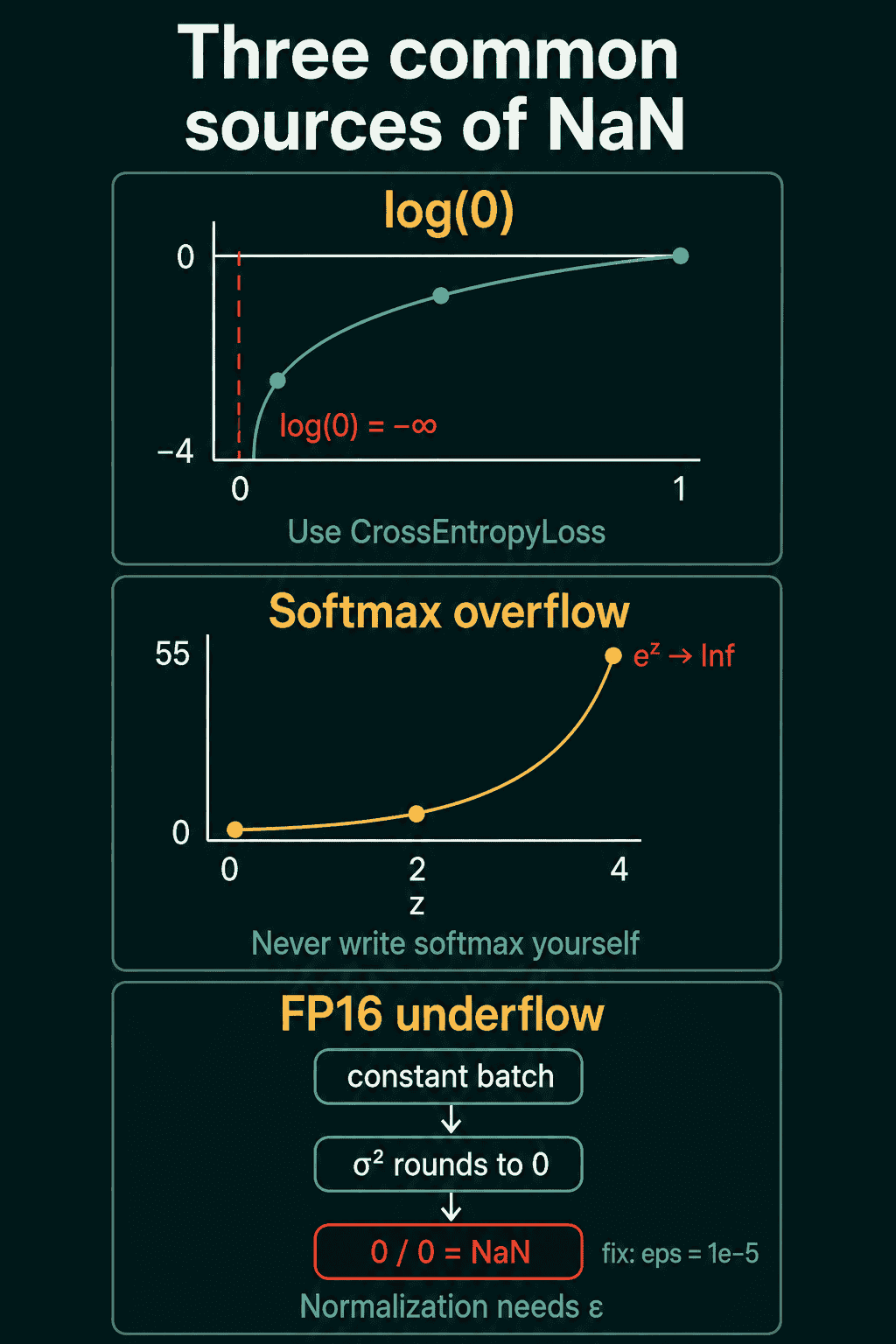
- Learning rate too high. The usual first suspect; parameters overflow after a few oversized steps.
- A log of zero. Computing
torch.log(probs)by hand where a probability is exactly 0.CrossEntropyLossandBCEWithLogitsLosshandle this internally; use them instead of hand-written versions. - A hand-written softmax. $e^{z}$ overflows for $z$ above about 88 in 32-bit floats.
F.softmaxsubtracts the maximum first; a hand-written one usually does not. - Division by zero in normalization. A variance that rounds to zero, especially in half precision, gives $0/0$. Normalization layers add a small $\epsilon$ for this reason.
Turn on torch.autograd.set_detect_anomaly(True) to have PyTorch report the first operation that produced a nan.
Related concepts
- Learning rate: the step-size multiplier that often explains a loss that is too slow, too jumpy, or
nan. - Overfitting and underfitting: a low training loss with a high validation loss is a different problem from a flat training loss, and has a different checklist.
- Gradient clipping: capping the gradient norm keeps a single large gradient from producing
nan. - Batch normalization: keeps activation scales stable so later layers do not saturate.
QuiddityML covers each item on this checklist as its own concept in the ML Foundation and PyTorch tracks, and its exercises include spotting the missing zero_grad() in a loop, predicting the loss a classifier reports when it ignores its inputs, and finding the softmax that should not be in front of CrossEntropyLoss.