By Sagi Shaier · 17 October 2026 · 7 min read
CDF, percentiles, and quantiles explained
How to compute a CDF for discrete and continuous data, how to read a median or a 95th percentile off it, and how to do both in PyTorch on real latency data.
The cumulative distribution function (CDF) of a random quantity gives the probability that it lands at or below a given value. A quantile runs the same question backwards: it gives the value that a chosen share of the probability lies at or below. Both show up whenever a question has a threshold in it, like what fraction of predictions have an error under 5%, or what response time 95% of requests stay under.
What the CDF measures
A random variable is a quantity whose value comes out of a random process, such as the result of a die roll or the response time of a server. It is written with a capital letter like $X$, and a specific value it can take with a lowercase letter like $x$. The CDF is written $F$, and it is defined as
$$F(x) = P(X \le x)$$
In words, $F(x)$ is the probability that $X$ comes out at or below $x$. Every random variable has a CDF, whether its values are countable like a number of clicks or continuous like a height.
The CDF of a discrete variable
A discrete variable has a probability mass function (PMF), which lists the probability of each value. Take a variable with three values:
$$P(X=1) = 0.2$$
$$P(X=2) = 0.5$$
$$P(X=3) = 0.3$$
The CDF at $x$ adds up the PMF values at or below $x$:
$$F(x) = \sum_{t \le x} P(X=t)$$
So $F(1) = 0.2$, $F(2) = 0.2 + 0.5 = 0.7$ and $F(3) = 0.2 + 0.5 + 0.3 = 1.0$. Between the values the CDF stays flat. $F(2.5)$ is still 0.7, because no value lies between 2 and 2.5. Below 1 it is 0, and from 3 on it is 1.
In PyTorch, torch.cumsum builds the whole discrete CDF in one call. Each entry is the running total of probs up to that position. For a single threshold, probs[values <= x].sum() keeps the probabilities of the values at or below x and adds them:
1import torch
2
3values = torch.tensor([1, 2, 3])
4probs = torch.tensor([0.2, 0.5, 0.3])
5
6cdf = torch.cumsum(probs, dim=0)
7print(cdf)
8print(probs[values <= 2].sum())
9print(probs[values <= 2.5].sum())
10# tensor([0.2000, 0.7000, 1.0000])
11# tensor(0.7000)
12# tensor(0.7000)
The CDF of a continuous variable
A continuous variable has a probability density function (PDF) $p(t)$ instead. A density value is not a probability, and the probability of a range is the area under the density over that range. The CDF is the area under the density from the far left up to $x$:
$$F(x) = \int_{-\infty}^{x} p(t)\,dt$$
The integral sign $\int$ means "area under the curve", here between $-\infty$ and $x$. The variable inside is called $t$ so it does not clash with the upper limit $x$.
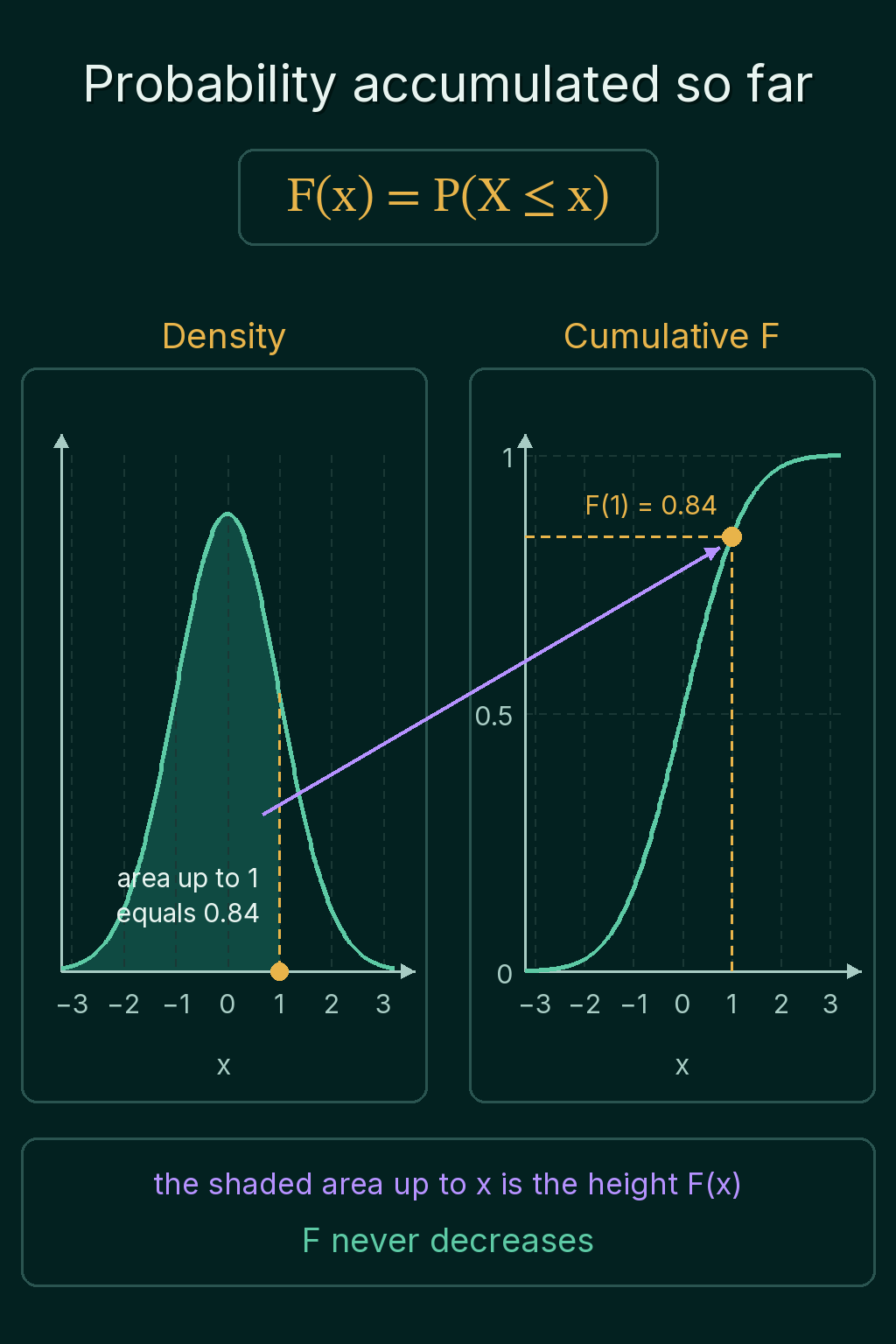
Take the standard normal distribution, the bell curve with mean 0 and standard deviation 1. Half of its area lies below 0, so $F(0) = 0.5$. The area up to 1 is about 0.84, so $F(1) = 0.84$, and a value drawn from it lands at or below 1 about 84% of the time. Moving $x$ to the right adds area under the curve, which raises $F(x)$:
torch.distributions.Normal has a cdf method that computes this area:
1import torch
2from torch.distributions import Normal
3
4std_normal = Normal(0.0, 1.0)
5x = torch.tensor([-1.0, 0.0, 1.0, 2.0])
6print(std_normal.cdf(x))
7print(std_normal.cdf(torch.tensor(1.0)) - std_normal.cdf(torch.tensor(-1.0)))
8# tensor([0.1587, 0.5000, 0.8413, 0.9772])
9# tensor(0.6827)
The second line shows a common use of the CDF: the probability of landing between two values is $F(b) - F(a)$. For the standard normal, 68% of the probability lies between $-1$ and 1.
Properties of every CDF
A few facts hold for every CDF, by definition:
- It never decreases. Moving $x$ to the right can only add probability.
- It starts at 0 far to the left and reaches 1 far to the right.
- It is a probability, so its values stay between 0 and 1, even when the density goes above 1.
A discrete CDF moves in jumps, one jump at each value, and the size of the jump is that value's probability. A continuous CDF rises smoothly, steepest where the density is highest.
Quantiles: reading the CDF backwards
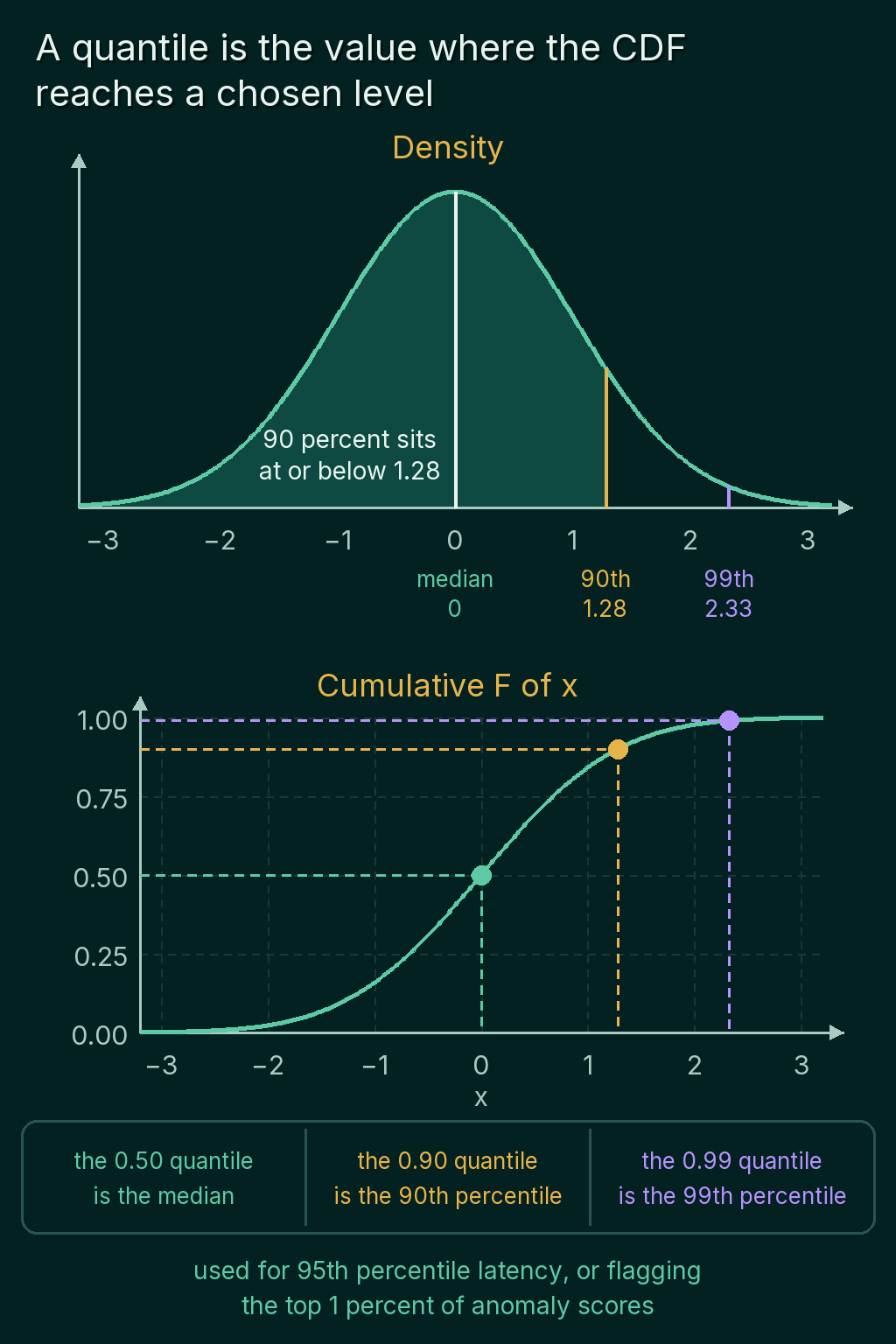
The CDF goes from a value to a probability. A quantile goes from a probability to a value. The $q$ quantile is the value where the CDF reaches the level $q$:
$$F(x) = q$$
If $F(x) = 0.9$, then $x$ is the 0.9 quantile, and 90% of the distribution lies at or below $x$. For the standard normal, the 0.9 quantile is 1.28 and the 0.99 quantile is 2.33. The 0.5 quantile is 0, since half of the area lies below 0.
A percentile is the same thing written out of 100:
- the 0.50 quantile is the 50th percentile, also called the median
- the 0.90 quantile is the 90th percentile
- the 0.99 quantile is the 99th percentile
Finding a quantile in code
For a discrete CDF, the quantile at level $q$ is the first value where the running total reaches $q$. For the PMF above, the CDF is 0.2, 0.7, 1.0. The first entry at or above 0.5 is 0.7, at the value 2, so the median is 2. For level 0.1 the first entry at or above it is 0.2, so the answer is 1. For level 0.9 it is the value 3.
1import torch
2
3def quantile(values, probs, level):
4    cdf = torch.cumsum(probs, dim=0)
5    idx = int((cdf >= level).nonzero()[0])
6    return values[idx]
7
8values = torch.tensor([1, 2, 3])
9probs = torch.tensor([0.2, 0.5, 0.3])
10
11print(quantile(values, probs, 0.5), quantile(values, probs, 0.1), quantile(values, probs, 0.9))
12# tensor(2) tensor(1) tensor(3)
cdf >= level marks each position True or False, and .nonzero()[0] gives the first True one. The values must be sorted in increasing order for this to work.
For a continuous distribution, PyTorch has the inverse of the CDF as icdf. Putting its output back into cdf returns the levels you started with:
1import torch
2from torch.distributions import Normal
3
4std_normal = Normal(0.0, 1.0)
5levels = torch.tensor([0.5, 0.9, 0.99])
6print(std_normal.icdf(levels))
7print(std_normal.cdf(std_normal.icdf(levels)))
8# tensor([0.0000, 1.2816, 2.3263])
9# tensor([0.5000, 0.9000, 0.9900])
Percentiles of real data
The same lookup works on a sample of measurements. Sort the sample, give each measurement probability $1/n$, and the running total is the CDF of the data. Here are 20 response times of a model server in milliseconds, with one slow request at 310 ms:
1import torch
2
3def quantile(values, probs, level):
4    cdf = torch.cumsum(probs, dim=0)
5    idx = int((cdf >= level).nonzero()[0])
6    return values[idx]
7
8latency_ms = torch.tensor([42.0, 38.0, 51.0, 45.0, 40.0, 39.0, 47.0, 44.0, 41.0, 43.0,
9                           46.0, 40.0, 38.0, 42.0, 49.0, 41.0, 44.0, 39.0, 43.0, 310.0])
10
11sorted_ms = torch.sort(latency_ms).values
12probs = torch.full((len(sorted_ms),), 1 / len(sorted_ms))
13
14print(latency_ms.mean())
15print(quantile(sorted_ms, probs, 0.5), quantile(sorted_ms, probs, 0.95))
16print(torch.quantile(latency_ms, 0.95))
17# tensor(56.1000)
18# tensor(42.) tensor(51.)
19# tensor(63.9498)
The mean is 56.1 ms, higher than 19 of the 20 requests, because the one slow request pulls it up. The median, 42 ms, describes a typical request. The 95th percentile, 51 ms, says 95% of requests finished in 51 ms or less. This is why latency is often reported as a percentile rather than an average.
Where CDFs and quantiles are used in ML
- Monitoring. Reporting the 95th or 99th percentile latency of a model server, or of a training step.
- Thresholds. Flagging the predictions in the top 1% of anomaly scores means finding the 0.99 quantile of the scores and flagging everything above it.
- Calibrating a decision threshold. Choosing the cutoff where a score distribution's CDF crosses a target probability, for example the score that 90% of negative examples stay under.
- Tail probabilities. $1 - F(x)$ is the probability of landing above $x$, which says how far into the tail an observation sits.
Common mistakes
- Reading a density value as the CDF. The density at $x$ is the height of the bell curve. The CDF at $x$ is the area to its left. For the standard normal at 0, the density is 0.399 and the CDF is 0.5.
- Mixing up the scales. A quantile level is between 0 and 1, and a percentile is between 0 and 100.
torch.quantile(x, 95)raises an error, and the call needs0.95. - Expecting a value from the data.
torch.quantileinterpolates between neighboring values by default. In the latency example it returned 63.95 ms, a time no request took, somewhere between 51 and 310. The lookup inquantileabove returns an actual measurement. - Forgetting to sort. The running-total lookup assumes the values are in increasing order. On unsorted values it returns a wrong answer without any error.
Related concepts
Random variables and PMF vs PDF explains the two kinds of distribution the CDF is built from. The Gaussian distribution post covers the bell curve used in the examples here, and how its z-scores turn any Gaussian quantile into a standard-normal one. Kernel density estimation estimates a smooth density from data, which can then be turned into a CDF by adding up area.
QuiddityML teaches the CDF and quantiles as two concepts in the Math track's probability unit, and the exercises on them include matching torch.cumsum code to the CDF equation, filling in the two steps that turn a PMF into a quantile lookup and writing quantile from scratch.