By Sagi Shaier · 17 October 2026 · 7 min read
Kernel density estimation explained
How KDE turns a handful of data points into a smooth density by hand and in PyTorch, how the bandwidth h changes the result, and where KDE is used for visualizing data and spotting anomalies.
Kernel density estimation (KDE) estimates the density of a continuous quantity from a sample of data, without assuming the data follows any named distribution. It is a common way to plot an unknown distribution, and to flag values that land where the data is sparse.
Why not assume a distribution?
A density is a curve whose area over a range is the probability of landing in that range, and its total area is 1. A named distribution like the Gaussian gives you a density with a fixed shape, and the data only has to fill in a few numbers such as the mean and the standard deviation. That works when you have a reason to believe the shape. Often you have a pile of numbers and no such reason: the data might have two separate clusters, a long tail, or a hard edge.
Take five data points as a running example:
$$1.0,\ 2.2,\ 3.0,\ 6.4,\ 7.2$$
They form two groups, three points around 2 and two points around 7. A single Gaussian fitted to them puts its peak near the middle, at 3.96, where there is no data at all.
The histogram and its problem
The simplest density estimate is a histogram. Split the number line into equal bins, count the points in each bin, and scale the counts so the total area is 1. With bins of width 2 starting at 0, the counts are 1, 2, 0 and 2. Dividing each count by $n \times \text{width} = 5 \times 2 = 10$ gives bar heights of 0.1, 0.2, 0 and 0.2.
The bar heights depend on where the bins start. Shift every bin edge left by 1, so the bins become $[-1, 1)$, $[1, 3)$ and so on. The same five points then give heights of 0, 0.2, 0.1, 0.1 and 0.1. The group around 7 is now split across two bars, and the gap between the groups has disappeared:
1import torch
2
3data = torch.tensor([1.0, 2.2, 3.0, 6.4, 7.2])
4n, width = len(data), 2.0
5
6for edges in ([0.0, 2.0, 4.0, 6.0, 8.0], [-1.0, 1.0, 3.0, 5.0, 7.0, 9.0]):
7    counts = torch.histogram(data, bins=torch.tensor(edges)).hist
8    print(edges, [round(v, 2) for v in (counts / (n * width)).tolist()])
9# [0.0, 2.0, 4.0, 6.0, 8.0] [0.1, 0.2, 0.0, 0.2]
10# [-1.0, 1.0, 3.0, 5.0, 7.0, 9.0] [0.0, 0.2, 0.1, 0.1, 0.1]
Each bar is also flat with hard edges, while the density the data came from is usually smooth.
One bump per data point
KDE drops the bins. It places a small smooth bump, called a kernel, centered on every data point, and adds the bumps up. Where points are close together their bumps stack, and the sum is high. Where there are no points the sum is close to 0. Nothing depends on bin edges, because there are none.
The kernel is a function $K(u)$ that has area 1 and peaks at $u = 0$. A Gaussian bump is a common choice:
$$K(u) = \frac{1}{\sqrt{2\pi}}e^{-u^{2}/2}$$
At $u = 0$ this is $1/\sqrt{2\pi} = 0.399$, and it falls off on both sides. At $u = 1$ it is 0.242, and at $u = 2$ it is 0.054.
The KDE formula
Write the data points as $x_1, \dots, x_n$, and let $h$ be the bandwidth, a positive number that sets how wide each bump is. The KDE estimate of the density at a point $x$ is
$$\hat p(x) = \frac{1}{nh}\sum_{i=1}^{n} K\!\left(\frac{x - x_i}{h}\right)$$
The hat on $\hat p$ marks it as an estimate. Read the formula from the inside out:
- $x - x_i$ is the distance from the query point $x$ to data point $x_i$.
- Dividing by $h$ measures that distance in bandwidths, so with $h = 0.7$, a point 1.4 away counts as 2 bandwidths away.
- $K$ turns the scaled distance into a bump height, high for nearby points and close to 0 for far ones.
- The sum adds the bumps from all $n$ points, and $1/nh$ scales the total so the area under $\hat p$ is 1.
A worked example by hand
Evaluate the estimate at $x = 2.5$ with $h = 0.7$. The scaled distances $(2.5 - x_i)/0.7$ for the five points are
$$2.14,\ 0.43,\ -0.71,\ -5.57,\ -6.71$$
Putting the first three into $K$ gives about 0.0402, 0.3639 and 0.3091. The points at 6.4 and 7.2 are more than 5 bandwidths away, so their kernel values are effectively 0. The sum is 0.7132, and
$$\hat p(2.5) = \frac{0.7132}{5 \times 0.7} = 0.2038$$
The same calculation in PyTorch, with data holding all $n$ points in one tensor:
1import math
2import torch
3torch.set_printoptions(precision=4, sci_mode=False)
4
5def gaussian_kernel(u):
6    return torch.exp(-u ** 2 / 2) / math.sqrt(2 * math.pi)
7
8def gaussian_kde(x, data, h):
9    u = (x - data) / h
10    return gaussian_kernel(u).mean() / h
11
12data = torch.tensor([1.0, 2.2, 3.0, 6.4, 7.2])
13
14print(gaussian_kernel((2.5 - data) / 0.7))
15print(gaussian_kde(2.5, data, 0.7))
16# tensor([    0.0402,     0.3639,     0.3091,     0.0000,     0.0000])
17# tensor(0.2038)
(x - data) / h computes every scaled distance at once, and .mean() does the $(1/n)\sum$ part, which leaves the division by $h$.
The bandwidth h
The bandwidth is the main setting to choose in KDE, and the hard one to get right.
- Too small. Each bump is a narrow spike on its own data point. The estimate is high exactly where the sample happened to land and near 0 a short distance away. It describes these five numbers and says little about the population they came from.
- Too large. Each bump is so wide that all of them merge into one broad hill. The gap between the two groups disappears.
- In between. The two groups show up as two smooth hills with a dip between them.
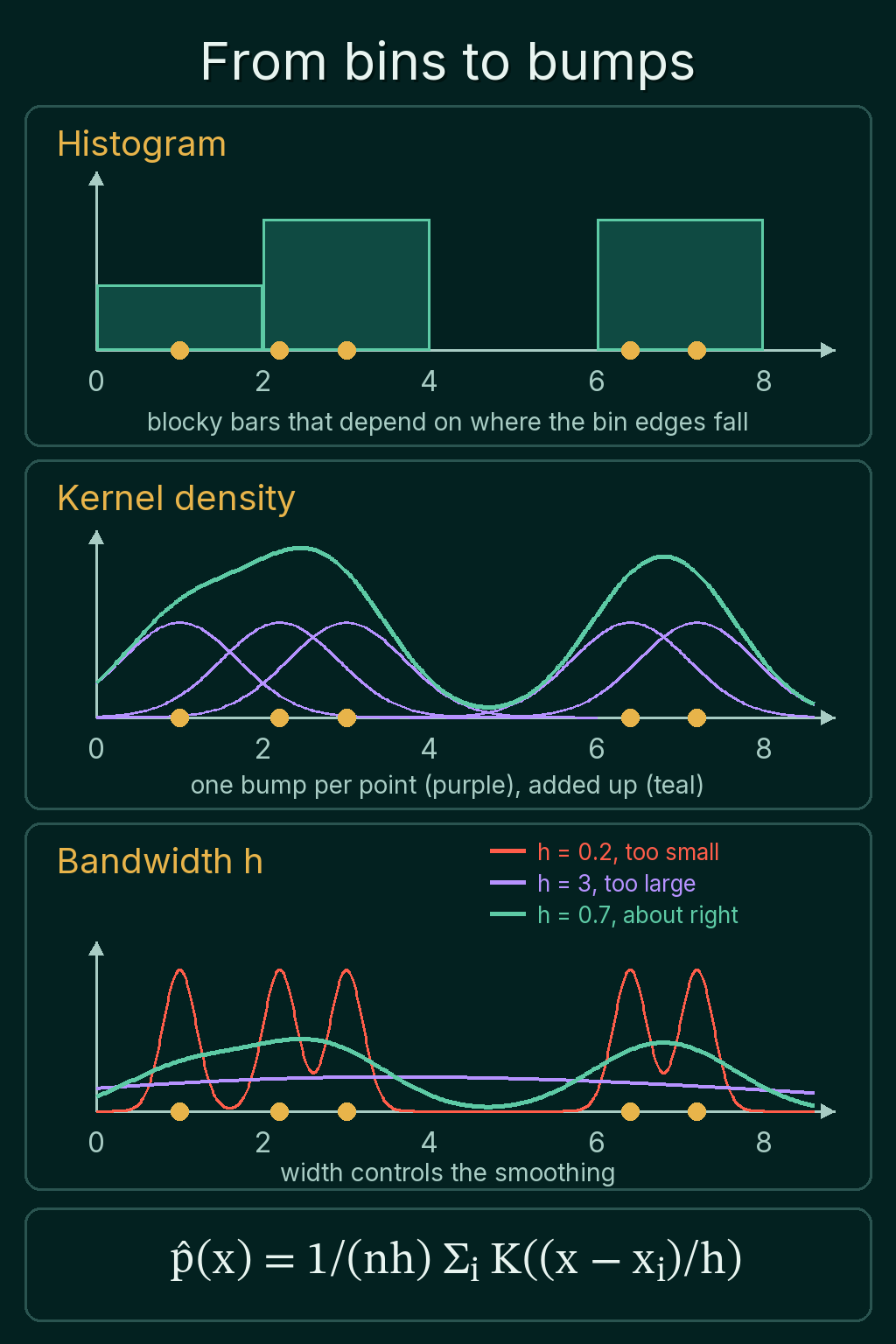
The numbers show the same thing. Compare the estimate at a data point, 2.2, with the estimate in the middle of the gap, 4.7:
1import math
2import torch
3
4def gaussian_kde(x, data, h):
5    u = (x - data) / h
6    return (torch.exp(-u ** 2 / 2) / math.sqrt(2 * math.pi)).mean() / h
7
8data = torch.tensor([1.0, 2.2, 3.0, 6.4, 7.2])
9
10for h in (0.2, 0.7, 3.0):
11    at_point = gaussian_kde(2.2, data, h)
12    in_gap = gaussian_kde(4.7, data, h)
13    print(f"h={h}: at 2.2 {at_point:.3f}, at 4.7 {in_gap:.3f}")
14
15grid = torch.linspace(-20, 30, 5001)
16density = torch.stack([gaussian_kde(x, data, 0.7) for x in grid])
17print(torch.trapezoid(density, grid))
18# h=0.2: at 2.2 0.399, at 4.7 0.000
19# h=0.7: at 2.2 0.200, at 4.7 0.012
20# h=3.0: at 2.2 0.093, at 4.7 0.095
21# tensor(1.)
With $h = 3$ the gap at 4.7 gets a slightly higher density than the data point at 2.2, so the estimate no longer shows two groups. With $h = 0.2$ the gap gets exactly 0 to three decimals. The last line adds up the area under the $h = 0.7$ estimate over a wide range and gets 1, as a density should.
Picking $h$ is a tradeoff between the two failures. A small $h$ follows the sample closely and changes a lot if you draw a new sample. A large $h$ is stable but smooths away real features of the data. This is the bias-variance tradeoff, applied to estimating a density instead of fitting a model.
Where KDE is used
- Plotting an unknown distribution. A KDE curve is a common way to look at the shape of a feature or of a model's prediction errors before choosing any model for them.
- Flagging unusual points. Fit a KDE on normal data, then evaluate it at a new point. A new point with a very low $\hat p(x)$, like 4.7 in the example, sits in a region with little data, which makes it a candidate anomaly.
Both uses work without committing to a Gaussian, a Poisson, or any other named family.
Common mistakes
- Forgetting the $1/h$. Averaging the kernel values without dividing by $h$ gives a curve whose area is $h$ instead of 1. The shape looks right, so the bug is easy to miss.
- Reading $\hat p(x)$ as a probability. It is a density. With a small $h$ it can be larger than 1. Probabilities come from area under the curve.
- Trusting one bandwidth. The same data can look like one group or two depending on $h$. Try a few values before reading anything into a bump.
- Expecting KDE to fix a tiny sample. With five points, the curve is mostly five copies of the kernel shape. KDE smooths a sample, and it cannot add information the sample does not have.
Related concepts
The Gaussian distribution is the usual kernel, and it is also the kind of fixed-shape model KDE avoids assuming. The common probability distributions post covers the named families that a parametric fit would choose between. PMF vs PDF explains why a density value is not a probability. The bias-variance tradeoff is the same tradeoff that sets the bandwidth, in the setting of model fitting.
QuiddityML teaches kernel density estimation as a concept in the Math track's probability unit, and the exercises on it include predicting what a too-small or too-large bandwidth does, picking the line of code that matches the KDE formula and writing gaussian_kde from scratch.